Powered by Blogger.
RSS

Hide Your Real IP Address With Hide IP Easy


Browsing on the Internet is becoming more and more dangerous in today's world. Hackers and identity thieves are trying to use IP address to get any information out of you: home address, credit card information, social security information, your bank accounts and other personal information.

Actually, keeping your privacy is simple and easy. Use Hide IP Easy to hide your real IP with a fake one, surf anonymously, prevent hackers from monitoring your activity, and provide full encryption of your online activity, all with the click of a button.


Hide IP Easy hides your real IP with a fake one, surf anonymously, prevent hackers from monitoring your activity, and provide full encryption of your online activity, all with the click of a button.

Anonymous Surfing With Hide IP Easy. Keeping your privacy is simple and easy. Use Hide IP Easy to keep your IP address hidden, ensure your privacy, provide full encryption of your online activity, and protect your identity and other personal information against hackers, all with a simple
click of Hide IP Easy button.

With Hide IP Easy, you can send anonymous emails, un-ban yourself from forums, Blogs, etc. Your identity is secure, protected, and anonymized. With it, you are able to be assigned one of our many fake proxy IP addresses which can be from different countries such as United States, United Kingdom, France, etc. Hide IP Easy works with Internet Explorer, Firefox, Opera, Maxthon, MyIE and is compatible with all types of routers, firewalls, home networks, wireless networks and any other kind of Internet..


Key Features
 => Anonymous Web Surfing
You are assigned fake IP addresses and protected from hackers who will be tricked by your fake IP instead of your real one.
 => Protect Your Identity
Surf anonymously to prevent websites, identity thieves or even government from compromising your computer, tracking your online activities, tracing your exact location or intercepting your private financial information.
=> Select Your Physical IP location
You decide fake IP of which country to use by choosing a country from the Choose IP Country window.
=> Send Anonymous E-mails
Hide your real IP in E-mail headers. Be protected while sending emails from Yahoo!, Hotmail, GMail.
=> Un-ban Yourself from Forums and Restricted Sites
Use Hide IP Easy to change your IP address and access forums and restricted sites that have ever banned you from.

  • Digg
  • Del.icio.us
  • StumbleUpon
  • Reddit
  • RSS

Compress 1GB File To 10MB With KGB Archiver


KGB Archiver is a free and open source compression tool with an unbelievably high compression rate. Data compression utility of this software is based on PAQ6 algorithm which has AES-256 powerful encryption. KGB archiver works on both Windows and Linux operating system.

Features 
Very high compression power with very accurate results and no loss of data.

When a file is compressed with KGB Archiver it saves its with own extension and
at the time of decompression it automatically recognizes the file format.

Multilanguage supports like Arabic, German, Greek, Japanese, Spanish many more.

Unicode is supported in both User Interface and File Systems.

An Explorer shell extension is available for the windows version.

Make Password protected compressed file.

Choose from different compression level (high, maximum, normal, low, very weak) to compress a file but the compression time will vary according to your selected compression level.

Supports native .kgb files and .zip files AES-256

Able to create self-extracting archives.


Limitations
Due to high compression, the time required to compress and decompress the file is high.

High system requirements

Decompressed file cannot be open or extract with other compression softwares.


Note: If you are compressing any file with KGB archiver and sending the comprssed file to your friends then he must have KBG archiver installed on his computer to decompress the file.

System Requirements
256 MB RAM
1.5 GHz Processor

Click Here To Download KGB Archiver

Note:
This KBG Archiver software cannot compress video format files.

  • Digg
  • Del.icio.us
  • StumbleUpon
  • Reddit
  • RSS

How To Download A Text Editor - Notepad ++


Notepad++ is a great text editor for windows and it is recommended for beginner, intermediate and advanced programmers. It is a lightweight and robust editor for a variety of programming and scripting languages. (PHP, HTML, Java, Javascript, ASP, C, C++, COBOL, LISP, Pascal, Perl, Python e.t.c)


Features
  • Tabbed document interface
  • Drag-and-drop
  • Auto-completion
  • Bookmarks
  • Syntax highlighting and syntax folding
  • File status auto detection
  • It's free!
How To Download
  1. Open your browser and go to http://google.com
  2. Type notepad++ in the search box and press enter, click on the first option that comes up 
  3. On the notepad's website click the download link
  4. Your website may change depending on when you are reading this post but click on download the current version
  5. Click on the installer and then save the file to your computer
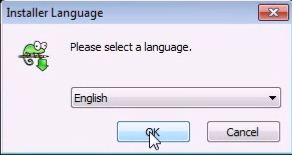
  6. After the download is completed open the installer and select English as your language
  7. Go through the installer and make sure you uncheck Run Notepad++ before you click on the finish button


  8. Create a desktop shortcut by clicking the windows key and go to All Programs
  9. Click on the folder called Notepad++
  10. Right click on the program Notepad++ and press send to Desktop
  11. Welldone! You've downloaded Notepad++, installed it and created a shortcut on your Desktop

  • Digg
  • Del.icio.us
  • StumbleUpon
  • Reddit
  • RSS

How To Delete Common Malware (Recycler) Using CMD


 Recycler is a malware or virus that creates shortcuts in a folder called "RECYCLER". It changes the attributes of the folder or a file into a hidden attribute and continue to resurface itself when deleted. External storage devices are prone to be infected easily with this kind of virus. Below is a step by step approach on how to handle this very situation.


Requirements: Infected external storage device such as usb flash drives or pc hard disk with recycler.

Step 1
Insert the affected external storage device i.e the external storage device that is infected with the recycler malware into a pc that has windows platform.

Step 2
Type "cmd.exe" in the search bar. Right click on the cmd.exe and click run as an administrator.

Step 3
Check the drive letter of the external storage device.

Step 4
Type the following command in the command line interface: 
atrrib -r -s -h /s /d F:\*.* 
and press enter.
Note that F is the drive letter of the external storage device that I used and it varies, yours might be different.

Step 5 
Wait for a while for the command to work on the malware on your external storage device and when it is done, exit the windows Command Line Interface (cmd).

Step 6
Navigate to your external storage device in "My computer" and check all your folders and files that was lost. If the command successfully worked on your storage device, all your missing files and folder will be restored back to your storage device together with their shortcuts created earlier by the malware.

Step 7
Lastly, all you need to do is highlight all the shortcuts in the external storage device and delete them permanently by pressing shift+delete.


  • Digg
  • Del.icio.us
  • StumbleUpon
  • Reddit
  • RSS

How To Hide A Folder Name And Icon

Below are steps on how to hide a folder name & icon without any software. This method only hides your folder icon and name. This is not protecting your folder from other people to open it.
Follow the steps below.

Create a new folder on your computer hard drive or select a folder that you want to hide the name & icon.

Rename the folder. When you rename it, hold down Alt key and press 0160. (When you are pressing 0160 this will show nothing.)

NOTE : You must on Num Lock (short for Number Lock) and use numeric keypad. Don't use the number on the top side of Alphabet keys. If you use laptop or other device where there are no extra Numerical keypad, then check the device manual to use Numerical keypad.

Now right click on the folder and select Properties select the tab Customize and select Change Icon. Scroll along and you should see a few blank spaces. Click on any one and click OK and Apply the settings.

Now your folder name and icon is invisible. If it shows the Type i.e. File Folder, then change your view to List, Small Icons, Medium Icons or Large Icons.

  • Digg
  • Del.icio.us
  • StumbleUpon
  • Reddit
  • RSS

Android Mobile Secret Codes


All major cell phone companies are launching android cellphones.If you are an android user, below are some secret codes of android which will help you.


Cell Battery, WiFi Usage etc Info  *#*#4636#*#*

Restore Factory Settings *#*#7780#*#*

Format Phone *2767*3855#

Launch service mode *#*#197328640#*#*

Test WiFi *#*#232339#*#* or *#*#526#*#* or *#*#528#*#*

Display WiFi MAC address *#*#232338#*#*

GPS test *#*#1472365#*#*

Other GPS test *#*#1575#*#*

Bluetooth test *#*#232331#*#*

Display Bluetooth physic address *#*#232337#*#

Start Gtalk monitoring *#*#8255#*#*

PDA, Phone, H/W, RFCallDate *#*#4986*2650468#*#*

PDA and Phone *#*#1234#*#*

FTA SW version *#*#1111#*#*

FTA HW version *#*#2222#*#*

PDA, Phone, csc, *#*#44336#*#*

Packet Loopback *#*#0283#*#*

LCD test *#*#0*#*#*

Melody test *#*#0673#*#* or *#*#0289#*#*

Device test such as vibration and lightness *#*#0842#*#*

Display touchscreen version *#*#2663#*#*

Touchscreen test *#*#2664#*#*

Distance sensor test *#*#0588#*#*

Display memory version *#*#3264#*#*

  • Digg
  • Del.icio.us
  • StumbleUpon
  • Reddit
  • RSS

Running A Java Program From Command Prompt

In order to run a Java program from the command prompt, follow the steps below carefully:
  • Create a temporary folder C:\mywork.  Using Notepad or another text editor, create a small Java file HelloWorld.java with the following text:
    public class HelloWorld
    {
    public static void main(String[] args)
    {
    System.out.println("Hello, World!");
    }
    }
     
    Learn how to create a helloworld app. 
     

  •  Save your file as HelloWorld.java in C:\mywork.  To make sure your file name is HeloWorld.java, (not HelloWorld.java.txt), first choose "Save as file type:" All files, then type in the file name HelloWorld.java

  •  Run Command Prompt (found under All Programs/Accessories in the Start menu).  Type
     
    C:\> cd \mywork
     
    This makes C:\mywork the current directory.
     
    C:\mywork> dir
     
    This displays the directory contents.  You should see HelloWorld.java among the files.
     
    C:\mywork> set path=%path%;C:\Program Files\Java\jdk1.5.0_09\bin
     
    This tells the system where to find JDK programs.
     
    C:\mywork> javac HelloWorld.java
     
    This runs javac.exe, the compiler.  You should see nothing but the next system prompt...
     
    C:\mywork> dir
     
    javac has created the HelloWorld.class file.  You should see HelloWorld.javaand HelloWorld.class among the files.
     
    C:\mywork> java HelloWorld
     
    This runs the Java interpreter.  You should see the program output:
     
    Hello, World!
     
    If the system cannot find javac, check the set path command.  If javac runs but you get errors, check your Java text.  If the program compiles but you get an exception, check the spelling and capitalization in the file name and the class name and the java HelloWorld command.  Java is case-sensitive!

  • It is possible to make the path setting permanent but you have to be very careful because your system might crash if you make a mistake. Proceed with extreme caution!

  • In Windows XP, go to Control Panel, choose "System," click on the "Advanced" tab, click on the "Environment variables" button. In the lower list, "System variables," click on Path: 
  •  Click "Edit" and at the end append
     
    ;C:\Program Files\Java\jdk1.5.0_09\bin

    (or the path to the appropriate folder where the latest version of JDK is installed).  Do not put spaces before the appended path string.

    Click OK on the path edit box and OK on the Ennvironment Variables box.  The new setting will go into effect next time you run Command Prompt

  • Digg
  • Del.icio.us
  • StumbleUpon
  • Reddit
  • RSS