Powered by Blogger.
RSS

How To Download A Text Editor - Notepad ++


Notepad++ is a great text editor for windows and it is recommended for beginner, intermediate and advanced programmers. It is a lightweight and robust editor for a variety of programming and scripting languages. (PHP, HTML, Java, Javascript, ASP, C, C++, COBOL, LISP, Pascal, Perl, Python e.t.c)


Features
  • Tabbed document interface
  • Drag-and-drop
  • Auto-completion
  • Bookmarks
  • Syntax highlighting and syntax folding
  • File status auto detection
  • It's free!
How To Download
  1. Open your browser and go to http://google.com
  2. Type notepad++ in the search box and press enter, click on the first option that comes up 
  3. On the notepad's website click the download link
  4. Your website may change depending on when you are reading this post but click on download the current version
  5. Click on the installer and then save the file to your computer
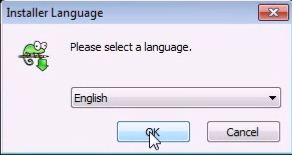
  6. After the download is completed open the installer and select English as your language
  7. Go through the installer and make sure you uncheck Run Notepad++ before you click on the finish button


  8. Create a desktop shortcut by clicking the windows key and go to All Programs
  9. Click on the folder called Notepad++
  10. Right click on the program Notepad++ and press send to Desktop
  11. Welldone! You've downloaded Notepad++, installed it and created a shortcut on your Desktop

  • Digg
  • Del.icio.us
  • StumbleUpon
  • Reddit
  • RSS

How To Delete Common Malware (Recycler) Using CMD


 Recycler is a malware or virus that creates shortcuts in a folder called "RECYCLER". It changes the attributes of the folder or a file into a hidden attribute and continue to resurface itself when deleted. External storage devices are prone to be infected easily with this kind of virus. Below is a step by step approach on how to handle this very situation.


Requirements: Infected external storage device such as usb flash drives or pc hard disk with recycler.

Step 1
Insert the affected external storage device i.e the external storage device that is infected with the recycler malware into a pc that has windows platform.

Step 2
Type "cmd.exe" in the search bar. Right click on the cmd.exe and click run as an administrator.

Step 3
Check the drive letter of the external storage device.

Step 4
Type the following command in the command line interface: 
atrrib -r -s -h /s /d F:\*.* 
and press enter.
Note that F is the drive letter of the external storage device that I used and it varies, yours might be different.

Step 5 
Wait for a while for the command to work on the malware on your external storage device and when it is done, exit the windows Command Line Interface (cmd).

Step 6
Navigate to your external storage device in "My computer" and check all your folders and files that was lost. If the command successfully worked on your storage device, all your missing files and folder will be restored back to your storage device together with their shortcuts created earlier by the malware.

Step 7
Lastly, all you need to do is highlight all the shortcuts in the external storage device and delete them permanently by pressing shift+delete.


  • Digg
  • Del.icio.us
  • StumbleUpon
  • Reddit
  • RSS

How To Hide A Folder Name And Icon

Below are steps on how to hide a folder name & icon without any software. This method only hides your folder icon and name. This is not protecting your folder from other people to open it.
Follow the steps below.

Create a new folder on your computer hard drive or select a folder that you want to hide the name & icon.

Rename the folder. When you rename it, hold down Alt key and press 0160. (When you are pressing 0160 this will show nothing.)

NOTE : You must on Num Lock (short for Number Lock) and use numeric keypad. Don't use the number on the top side of Alphabet keys. If you use laptop or other device where there are no extra Numerical keypad, then check the device manual to use Numerical keypad.

Now right click on the folder and select Properties select the tab Customize and select Change Icon. Scroll along and you should see a few blank spaces. Click on any one and click OK and Apply the settings.

Now your folder name and icon is invisible. If it shows the Type i.e. File Folder, then change your view to List, Small Icons, Medium Icons or Large Icons.

  • Digg
  • Del.icio.us
  • StumbleUpon
  • Reddit
  • RSS

Android Mobile Secret Codes


All major cell phone companies are launching android cellphones.If you are an android user, below are some secret codes of android which will help you.


Cell Battery, WiFi Usage etc Info  *#*#4636#*#*

Restore Factory Settings *#*#7780#*#*

Format Phone *2767*3855#

Launch service mode *#*#197328640#*#*

Test WiFi *#*#232339#*#* or *#*#526#*#* or *#*#528#*#*

Display WiFi MAC address *#*#232338#*#*

GPS test *#*#1472365#*#*

Other GPS test *#*#1575#*#*

Bluetooth test *#*#232331#*#*

Display Bluetooth physic address *#*#232337#*#

Start Gtalk monitoring *#*#8255#*#*

PDA, Phone, H/W, RFCallDate *#*#4986*2650468#*#*

PDA and Phone *#*#1234#*#*

FTA SW version *#*#1111#*#*

FTA HW version *#*#2222#*#*

PDA, Phone, csc, *#*#44336#*#*

Packet Loopback *#*#0283#*#*

LCD test *#*#0*#*#*

Melody test *#*#0673#*#* or *#*#0289#*#*

Device test such as vibration and lightness *#*#0842#*#*

Display touchscreen version *#*#2663#*#*

Touchscreen test *#*#2664#*#*

Distance sensor test *#*#0588#*#*

Display memory version *#*#3264#*#*

  • Digg
  • Del.icio.us
  • StumbleUpon
  • Reddit
  • RSS

Running A Java Program From Command Prompt

In order to run a Java program from the command prompt, follow the steps below carefully:
  • Create a temporary folder C:\mywork.  Using Notepad or another text editor, create a small Java file HelloWorld.java with the following text:
    public class HelloWorld
    {
    public static void main(String[] args)
    {
    System.out.println("Hello, World!");
    }
    }
     
    Learn how to create a helloworld app. 
     

  •  Save your file as HelloWorld.java in C:\mywork.  To make sure your file name is HeloWorld.java, (not HelloWorld.java.txt), first choose "Save as file type:" All files, then type in the file name HelloWorld.java

  •  Run Command Prompt (found under All Programs/Accessories in the Start menu).  Type
     
    C:\> cd \mywork
     
    This makes C:\mywork the current directory.
     
    C:\mywork> dir
     
    This displays the directory contents.  You should see HelloWorld.java among the files.
     
    C:\mywork> set path=%path%;C:\Program Files\Java\jdk1.5.0_09\bin
     
    This tells the system where to find JDK programs.
     
    C:\mywork> javac HelloWorld.java
     
    This runs javac.exe, the compiler.  You should see nothing but the next system prompt...
     
    C:\mywork> dir
     
    javac has created the HelloWorld.class file.  You should see HelloWorld.javaand HelloWorld.class among the files.
     
    C:\mywork> java HelloWorld
     
    This runs the Java interpreter.  You should see the program output:
     
    Hello, World!
     
    If the system cannot find javac, check the set path command.  If javac runs but you get errors, check your Java text.  If the program compiles but you get an exception, check the spelling and capitalization in the file name and the class name and the java HelloWorld command.  Java is case-sensitive!

  • It is possible to make the path setting permanent but you have to be very careful because your system might crash if you make a mistake. Proceed with extreme caution!

  • In Windows XP, go to Control Panel, choose "System," click on the "Advanced" tab, click on the "Environment variables" button. In the lower list, "System variables," click on Path: 
  •  Click "Edit" and at the end append
     
    ;C:\Program Files\Java\jdk1.5.0_09\bin

    (or the path to the appropriate folder where the latest version of JDK is installed).  Do not put spaces before the appended path string.

    Click OK on the path edit box and OK on the Ennvironment Variables box.  The new setting will go into effect next time you run Command Prompt

  • Digg
  • Del.icio.us
  • StumbleUpon
  • Reddit
  • RSS

Websites To Download Android Apps That Aren't Google Play Store #2

Here are some places to find free and paid apps without Google’s help. You can go to the first post on this topic to view sites that are not listed below.

Appitalism
Appitalism brands itself as the Social App Superstore.  This site depends on its users to collectively determine the best apps.

 YAAM
YAAM stands for Yet Another Android Market, because the developers have a sense of humor. But they also have an idea that really does make YAAM different from most other repositories of Android apps — developers get to keep 100% of the revenue from sales, minus PayPall fees.

AndroidPIT
Not only does AndroidPIT offer a web-based app you can use to download and purchase apps, but the company maintains an app news blog and a page with the latest “test reports,” or app reviews.
 
GetJarGetJar is the worlds largest free app store.  The store boasts over two billion downloads to date and over 150,000 apps available across many different platforms.

F-Droid
The F-Droid repository is a place to find free and open source apps for Android. Not only are all the apps in the directory open souce, but you can find multiple versions of most apps in case you want to use something other than the latest release.

 Handster
At the Handster app store you can quickly browse for apps by categories. Or you can do a quick search.  Like most stores  you can look at apps by various popularity categories as well.

Handmark
I tend to think of Handmark as a company which creates mobile software… but the company also acts as a distributor of mobile apps. You can find hunreds of apps at the Handmark web site. Just enter your name and phone number and the company will email you a download link

  • Digg
  • Del.icio.us
  • StumbleUpon
  • Reddit
  • RSS

Websites To Download Android Apps That Aren't Google Play Store


Here are some places to find free and paid apps without Google’s help. There are a few hundred thousand apps available for download from Google’s official Android Market. But not every Android device can access the Market, and not every app is available from Google’s app superstore.

Gameloft, for instance, has a reputation for releasing highly polished (if not exactly original) games without always going through the Android Market. Other developers, such as Grooveshark, have been booted from the Market but continue to offer apps for Android users, because unlike iOS, Windows Phone 7, and some other mobile platforms, Android allows users to install apps that aren’t downloaded from the official Market.

Note that Appbrain, Cyrket, AndroLib and other third party App directories are not included in this list. Those all require you to download apps through the Android Market. The following app stores are all designed to let you download and install apps directly.

Aproov
Aproov gives you filtering by category and the ability to search.  Aproov has their own algorithim called App Rank to filter apps to the top of lists based on several rankings.


Amazon Appstore
 The Amazon Appstore is the Amazon.com foray into the Android apps download market.  And Amazon is off to a great start.  They have an amazing organizational system for the apps and they also boast their own recommendation engine.  This is a great place for the new Android owner to head to.  You also get the Amazon style reviews that you see on their main site Amazon.com.


Phoload
Phoload has two things that make it stand out from the crowd.  First it is a community based site and depends heavily on its users to rate apps.  Second it’s a totally free application store.

PocketGear
PocketGear bills themselves as the world’s largest Android apps download marketplace.  And this very well may be true.  PocketGear has been around for a very long time.  PocketGear like most other sites give you the ability to search and offers views of top apps in different areas.

Appoke
 Appoke is a social app store, allowing you to see which apps your friends are using to find new apps you might like. You can also send app recommendations to your friends.

SlideME
 This is one of the oldest alternative marketplaces for Android apps. The company was founded in 2008 with the goal of making Android apps available in regions and on devices that aren’t normally supported.


AndAppStore
 Soon to be replaced with a new marketplace called So.cio featuring apps, games, eBooks, and music, AndAppStore currently offers a simple but effective app for locating and downloading apps on your Android device.


OpenAppMkt
The developers behind OpenAppMkt take a very different approach to app discovery than most others. The app store provides a directory of HTML5-based web apps which run in your web browser, but which behave much like native apps.


  • Digg
  • Del.icio.us
  • StumbleUpon
  • Reddit
  • RSS